
Managing User Licenses
0.4 min read
|
Managing User Licenses
After creating a user within Extensiv Hub, you must then assign that user a license. The type of license will determine what area of Warehouse Manager that user can access.
Navigate to the Admin-Users tab on the menu bar and click on the Assign User Licenses button
Next you will assign a license to a user.
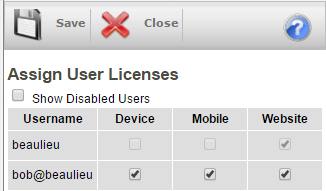

| License Type | Description |
|---|---|
| Device | Used for a handheld scanning device (Datalogic Skorpio, Falcon, etc.) |
| Mobile | Mobile order entry license. Used for the mobile app (iphone, android, or mobile.scoutsft.com) |
| Client View | Customer portal license. Must be given to allow clients to view your inventory. See Customer Portal |
| Website | Main Admin website license. By default your main admin will have 1. |