
Shopify Order Statuses
1.9 min read
|Order Manager does not pull in orders that are in the following statuses:
- Shipped
- Refunded (Fully)
- Voided
See here for more information on Shopify order statuses.
Partially Refunded Orders
Orders in a Partially Refunded status in Shopify can be downloaded into Order Manager. Simply go to the Settings module, select the Shopify store you want to enable the setting for, and click Edit. Then click the Connection tab, then the Edit Integration button. Lastly, check the checkbox option for Download partially refunded orders and then Save.
Order Amount Partially Refunded
If the order was partially refunded overall but no items were affected, Order Manager will subtract the refunded amount from the Order Total and the Amount Paid.
Order Items Fully or Partially Refunded
If the order has partially or fully refunded items, Order Manager will remove any fully refunded items from the order when downloading (but record it in the order history), and subtract the quantity refunded from any other order items.
Example:
Shopify Order #ABC was originally for 2 items: 2 x SKU X ($10 total) & 1 x SKU Y ($3).
1 unit of SKU X was fully refunded in Shopify ($5) shortly after being placed. Now Order #5 is in a Partially Refunded status with an Order Total & Amount Paid of $8, with $5 being refunded.
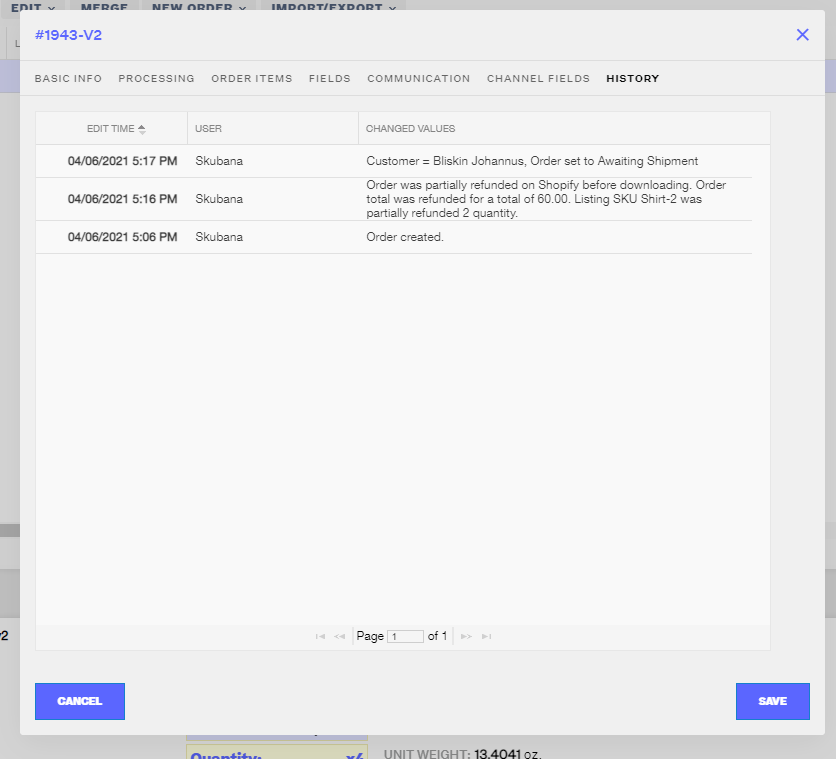
Order #ABC was then pulled into Order Manager from Shopify. Order #5 in Order Manager is for 1 x SKU X & 1 x SKU Y, but the order history notes that 1 unit of SKU X was partially refunded for 1 unit. The Order Total and Amount Paid in Order Manager are both $8, and the order history notes that the Order Total was refunded for a total of $5.
Example of how the order history will describe the refund history that happened in Shopify.
Shopify On Hold Status - Beta Feature
Shopify offers the ability for apps to promote items in a small time window after a customer places their order online. This is called a post-purchase upsell and allows items to be added to an order after an order is already in a status that Order Manager would normally recognize as available to download. This On Hold status feature is in beta and would allow a specific flow to better support the upsell ability of certain Shopify upsell apps.
Note
Contact your Customer Success Manager or Support to enable this beta feature for your account. Please be aware that the feature is also in beta with Shopify directly, so any issues with the flow should be reported to both Order Manager and Shopify support teams.
How it Works
This feature sees orders in an “On Hold” status in Shopify and doesn’t pull them into Order Manager until the order is removed from the “On Hold” status, as changing that order status is what most of the upsell Shopify apps do.
After this criterion is met, the order would no longer be considered in On Hold status in Shopify, and Order Manager would recognize that change the next time it automatically checks on Shopify orders (roughly every 15 minutes). Order Manager would then pull the order in and it would be created and handled just like any other new Shopify order, but with the order items representing the order post-upsell.
Was this article helpful?
Share additional feedback about this article