
Cin7 Settings
0.7 min read
|
This page covers the various options that can be set in Extensiv Integration Manager and in your Cin7 account.
Integration Manager Settings
| Setting | Description | Default |
| Sale Status | Select the status orders need to be in for Integration Manager to pull them | Processing |
| Process Status | Integration Manager will change orders to selected status after picking them up | Release To Pick |
| Branch ID | Specify a Branch ID to only load orders for that Branch. Leave blank to load all orders. | |
| Load Branch Transfers | If you specify a Branch ID, this option will become available. Enable it to load transfers scheduled from this branch to other branches into Integration Manager as Sales Orders for shipping. | No |
| Item Sku Field | Which Cin7 field will contains your full item SKU? Full Code is usually the best option. | Full Code |
| Invoice Orders After Shipping | Should Integration Manager pass an invoice date when adding shipping information to the sales order in Cin7? | No |
Cin7 Info
Branch ID
You can find your Branch ID by following these instructions:
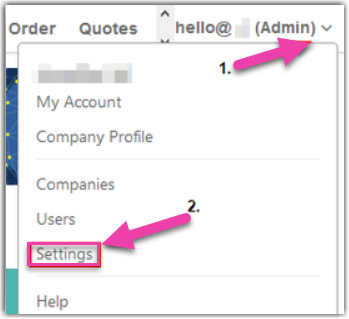
- Within Cin7, mouse over your login info (top right), then select Settings from the pop-up menu.
- Under Branches, Select List Branches
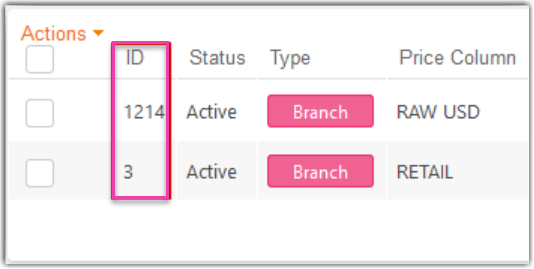
- The ID will be listed next to your branch.
Was this article helpful?
Share additional feedback about this article