
Setting Up Etsy
1.8 min read
|Important Update on Etsy Third-Party Shipping Integrations
Effective October 21, 2024, Etsy has updated its data-sharing policy and will now restrict access to personally identifiable information (PII) to the following approved third-party shipping providers, based on seller location:
- United States: Shippo and ShipStation
- Canada: ShipStation and Chit Chats
- Türkiye: ShipEntegra
For full details on Etsy’s policy changes, please refer to their official article here.
What this means for Extensiv customers:
Extensiv will continue to support Etsy integrations in accordance with these updated data access policies.
If your Etsy account was connected to Extensiv before October 21, 2024, your integration will remain active, and shipping data—including customer address information—will continue to sync as usual.
However, new Etsy connections made on or after October 21, 2024, will no longer include customer address details on imported orders, due to Etsy’s new restrictions.
Integration Specs:
Supported functions:
- Order Download
- Shipment Confirmation
- Inventory Sync
- Required Parameters
- Etsy Shop ID
- Etsy Username
- Etsy Password
Workflow
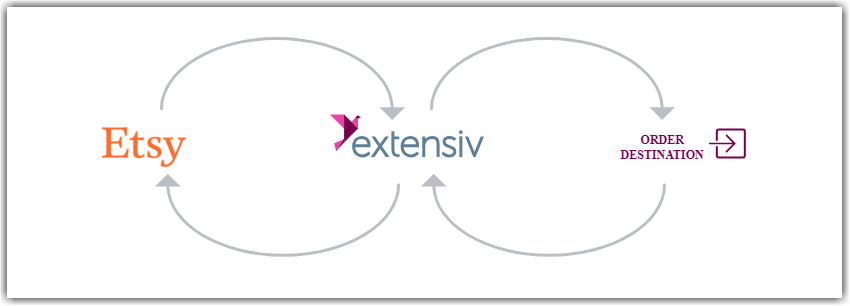
- Extensiv Integration Manager retrieves new orders from Etsy.
- Integration Manager delivers orders to WMS/OMS.
- Integration Manager retrieves shipment tracking and inventory levels from WMS/OMS.
- Integration Manager delivers shipment tracking and inventory levels to Etsy.
Step-by-step guide
- Go here to lookup your Etsy Shop ID: https://app.cartrover.com/get_etsy_shop_id.php
- Go to the Extensiv Integration Manager new Etsy setup page, and fill in your Shop ID.
- Click on Grant Us API Access button to start the connection with Etsy.
- If you don't have login access yourself, Instead click Share Setup Link, enter the client's email and click Save. They will receive a setup email. Instructions for client to follow: Cart Setup Share
- A new window will open and redirect you to Etsy Login Page. Please follow instructions on the page to finish the connection process.
- Click on the Test button in Integration Manager to verify if the connection works. Then click on OK button to save the connection.
Inventory Sync
Integration Manager will only sync inventory to active Etsy products. If your products are inactive because you have not yet started selling, Integration Manager will sync inventory once you have activated your products as long as the SKU in Etsy matches the SKU in your backend or WMS system.
Automatic Activation of Listings
Etsy does not allow apps like Integration Manager to set inventory levels to 0 when an item is out of stock. Instead, if an item is out of stock, Integration Manager will mark it as Disabled/Inactive.
With "Automatic Activation of Listings" enabled, If Integration Manager detects that a previously active Etsy product becomes inactive, but there is inventory available, Integration Manager will automatically attempt to re-activate that listing when adjusting the quantity. This may lead to re-listing charges in your Etsy account. This feature is useful to automatically re-activate your Etsy listings once new inventory has arrived at the warehouse.
If you wish to stop selling a product on Etsy, ensure that the inventory level in your WMS is 0. If not, you must add the product SKU to the Item Blacklist in Integration Manager or turn off the Auto Renew Inactive Products feature in the Integration Manager Etsy settings.
Was this article helpful?
Share additional feedback about this article