
Setting Up Shopify
1.2 min read
|Shopify Basic and Starter Plans
Please note that Personal Identifiable Information (PII) is no longer accessible for Shopify Basic and Starter Plans. Access to PII is essential for shipping, as it includes the customer's address and key details needed for outbound deliveries.
Integration to the Extensiv applications will cease to function without upgrading to a subscription plan that includes PII access. To check your current subscription, please navigate to Shopify > Settings > Plan.
Required parameters
Credentials from Shopify that need to be entered in Extensiv Integration Manager. The setup guide below will explain how to obtain these:
- Store Name or Shop URL
URL Format: https://.myshopify.com/
- Shopify Username
- Shopify Password
Step-by-step guide
- Launch Integration Management from Extensiv Hub.

- Navigate to Carts and click +New Setup.

- Select Shopify from the list of carts.

- Enter your Shopify Store Name or URL.
- Click Grant Us API Access in Integration Management.
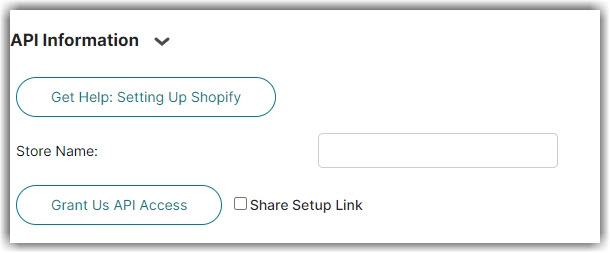
Click Share Setup Link if you don't have the login access yourself. Then, enter the client's email and click Save. The client will receive a setup email and can follow the instructions outlined in Cart Setup Share.
- Login to Shopify if requested.
- Click Install app towards the bottom of the Shopify page. This page lists what permissions the Integration Manager app requires.
- You will be taken back to Integration Management. After a few seconds you should see Successful Authorization display on the screen.
- Scroll to the bottom and Test the connection.
- Click OK to save the connection.
For mapping questions, please reach out to your Customer Success Manager or Support member.
Inventory location name
If you have a multi-warehouse setup in Shopify, you must specify the location name that you would like Integration Manager to sync inventory and confirm orders to. The Location name is found in Shopify under Settings → Locations as shown in the screenshot below. Please enter the location name on the Integration Manager Shopify cart > Edit Cart setup > Inventory Location Name.
Shopify Setting Options
Read our article on various Shopify options in Shopify Settings.
Was this article helpful?
Share additional feedback about this article