
Shipping with TikTok
2.5 min read
|This article reviews the features and services available when shipping TikTok orders through Small Parcel Suite and how to connect Tiktok carrier account to Small Parcel Suite.
Prerequisites
Before you connect a TikTok Shop account in Small Parcel Suite, make sure both of these requirements are met:
- TikTok Shipping is enabled for the TikTok Shop in TikTok Seller Center. Small Parcel Suite can only generate TikTok shipping labels for shops that use TikTok Shipping. If TikTok Shipping isn't enabled, label requests for that shop's orders fail.
- Your TikTok orders include the TikTok order data needed to generate labels. Complete the configuration requirements in Understanding How Extensiv Supports TikTok's Shipping and Fulfillment Process.
Supported features
Feature |
Description |
Supported? |
Adult Signature |
Requires recipient to sign for a delivery and be at least 21 years old |
No |
Carrier Insurance |
Insurance available for purchase through carrier |
No |
Delivery Confirmation |
Allows recipient to receive text or email notification upon delivery |
No |
Direct Signature |
Requires someone at the delivery address to sign at time of delivery |
No |
Domestic Shipping |
Shipping supported in U.S. |
Yes |
Electronic Customs Submission |
Commercial invoice is automatically delivered to customs after shipping label is printed |
No |
End of Day (Electronic) |
Order is automatically manifested with carrier |
Yes |
End of Day (PDF) |
No |
|
Shipping supported outside of U.S. |
No |
|
Label Reference Fields |
Allows up to three label messages per shipping label |
No |
Multi-Package Shipping |
Multiple packages allowed per shipment |
Yes |
Multiple Accounts |
Allows connection of multiple prepaid billing accounts |
Yes |
Rate Shopping |
Returns estimated shipping rates |
Yes |
Return Labels |
No |
|
Signature Confirmation |
Requires someone at or near the delivery address to sign at time of delivery |
No |
Third-Party Billing |
Allows billing of shipping costs to a third-party that is not the shipper or receiver |
No |
Parcel Tracking |
Track delivery progress of your small parcel shipments. |
Yes |
Supported services
The ship services listed below are available when shipping Tiktok orders in 3PL Warehouse Manager. Please note that these service names may vary slightly from their official carrier labels.
Service |
Transport Territory |
FedEx 2Day |
USA |
| FedEx Express Saver | USA |
| FedEx Ground | USA |
| UPS 2nd Day Air | USA |
| UPS Ground | USA |
| UPS Next Day Air | USA |
| USPS Ground Advantage | USA |
| USPS First CLass Mail | USA |
| USPS Priority Mail | USA |
| USPS Priority Mail Express | USA |
Connection guidelines
Before you can start shipping orders through TikTok Shipping, you must first connect to the TikTok Shop account in Small Parcel Suite from the Small Parcel Settings page.
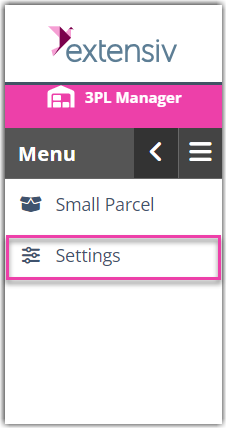
- Navigate to the Small Parcel space, then select Settings and select a customer from the drop-down menu.
-
Select the customer you’re connecting to TikTok for.

- In the Carrier Accounts section, click Create, then click Carrier Account.

- Using the drop-down menus, specify whether you are setting up a 'Warehouse Account' or 'Customer Account', select the relevant warehouse or customer, choose TikTok Shop from the carrier drop-down, and TikTok from the provider drop-down, then click Next.

Note: Most 3PLs are going to connect TikTok accounts as a Customer account type. - Enter a nickname for the account and then click Authorize with TikTok Shop.

- Select Yes if you have the email/password for the TikTok account or select No if you don’t, and then Next.

6.1 If you have the TikTok credentials, you’ll follow the TikTok flow to log in and authorize Small Parcel Suite to connect to the TikTok Shop.
6.2 If you don’t have the TikTok credentials, you’ll get a temporary link to share with the TikTok account owner to complete the connection process.
If you have the TikTok Credentials
- Enter the email and password and log into TikTok Shop.

-
Click Confirm to install to give Extensiv access to the TikTok Shop.

-
Scroll to the bottom. Click the checkbox to acknowledge giving Extensiv access to the TikTok Shop data. Then click Authorize.

You successfully connected Extensiv to your TikTok Shop.

- Navigate back to Small Parcel Suite in Extensiv and click Check TikTok Shop Connection to complete the connection in Small Parcel Suite.

-
Once you’ve connected the TikTok account, select the TikTok Shop you want to connect for this customer and then click Save Connection.

Was this article helpful?
Share additional feedback about this article