
Shipping with Amazon Shipping
1.8 min read
|This article reviews the features and services available when shipping Amazon Shipping orders through Small Parcel Suite, as well as how to connect a Amazon Shipping carrier account to Small Parcel Suite.
Supported providers
Label Provider |
Supports Amazon Shipping? |
BUKU Ship |
Yes |
Pitney Bowes |
No |
ShipEngine |
No |
Supported features
Feature |
Description |
Supported? |
Adult Signature |
Requires recipient to sign for a delivery and be at least 21 years old |
No |
Carrier Insurance |
Insurance available for purchase through carrier |
No |
Collect Billing |
Allows a shipment to be billed to the consignee. |
No |
Delivery Confirmation |
Allows recipient to receive text or email notification upon delivery |
No |
Direct Signature |
Requires someone at the delivery address to sign at time of delivery (Specific to FedEx; Configured under Shipping Info) |
No |
Domestic Shipping |
Shipping supported in U.S. |
Yes |
Electronic Customs Submission |
Commercial invoice is automatically delivered to customs after shipping label is printed |
No |
End of Day (Electronic) |
Order is automatically manifested with carrier |
N/A (no manifesting required) |
End of Day (PDF) |
N/A (no manifesting required) |
|
Shipping supported outside of U.S. |
No |
|
Label Reference Fields |
Allows up to three label messages per shipping label |
No |
Multi-Package Shipping |
Multiple packages allowed per shipment |
No |
Multiple Accounts |
Allows connection of multiple prepaid billing accounts |
Yes |
Rate Shopping |
Returns estimated shipping rates |
Yes |
Return Labels |
Yes |
|
Signature Confirmation |
Requires someone at or near the delivery address to sign at time of delivery |
No |
Third-Party Billing |
Allows billing of shipping costs to a third party that is not the shipper or receiver |
No |
Tracking |
Verification of delivery progress |
Yes |
Supported Services
Service |
Transport Territory |
Amazon Ground |
USA |
Connection Guidelines
Before you can start shipping orders through Amazon Shipping, you must first connect your Amazon Shipping account to Small Parcel Suite from the Small Parcel Settings page.
If you connect a customer's Amazon Shipping account to Small Parcel Suite, you cannot use your primary warehouse account for that customer when shipping with Amazon Shipping.
- Navigate to the Small Parcel space, then select Settings and select a customer from the drop-down menu.
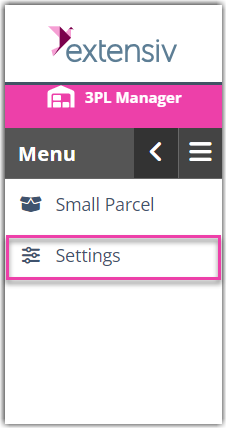
- In the Carrier Accounts section, click Create, then click Carrier Account.

- Using the drop-down menus, specify whether you are setting up a 'Warehouse Account' or 'Customer Account', select the relevant warehouse or customer, choose Amazon Shipping from the carrier drop-down, and Bukuship from the provider drop-down, then click Next.

- Fill out each of the fields in the connection screen with the required credentials. Once all fields have been filled in, click on Authorize with Amazon Shipping. If all credentials are valid, your Amazon Shipping account will now be connected to Small Parcel Suite, and you can begin printing labels for Amazon Shipping
Additional Requirements
- An active Amazon Shipping pickup must be scheduled at the warehouse in order to rate shop and print labels.
- Packages must be no more than 50 pounds with a maximum length of 59 inches, height of 33 inches, width of 33 inches, and a girth of 130 inches.
Was this article helpful?
Share additional feedback about this article